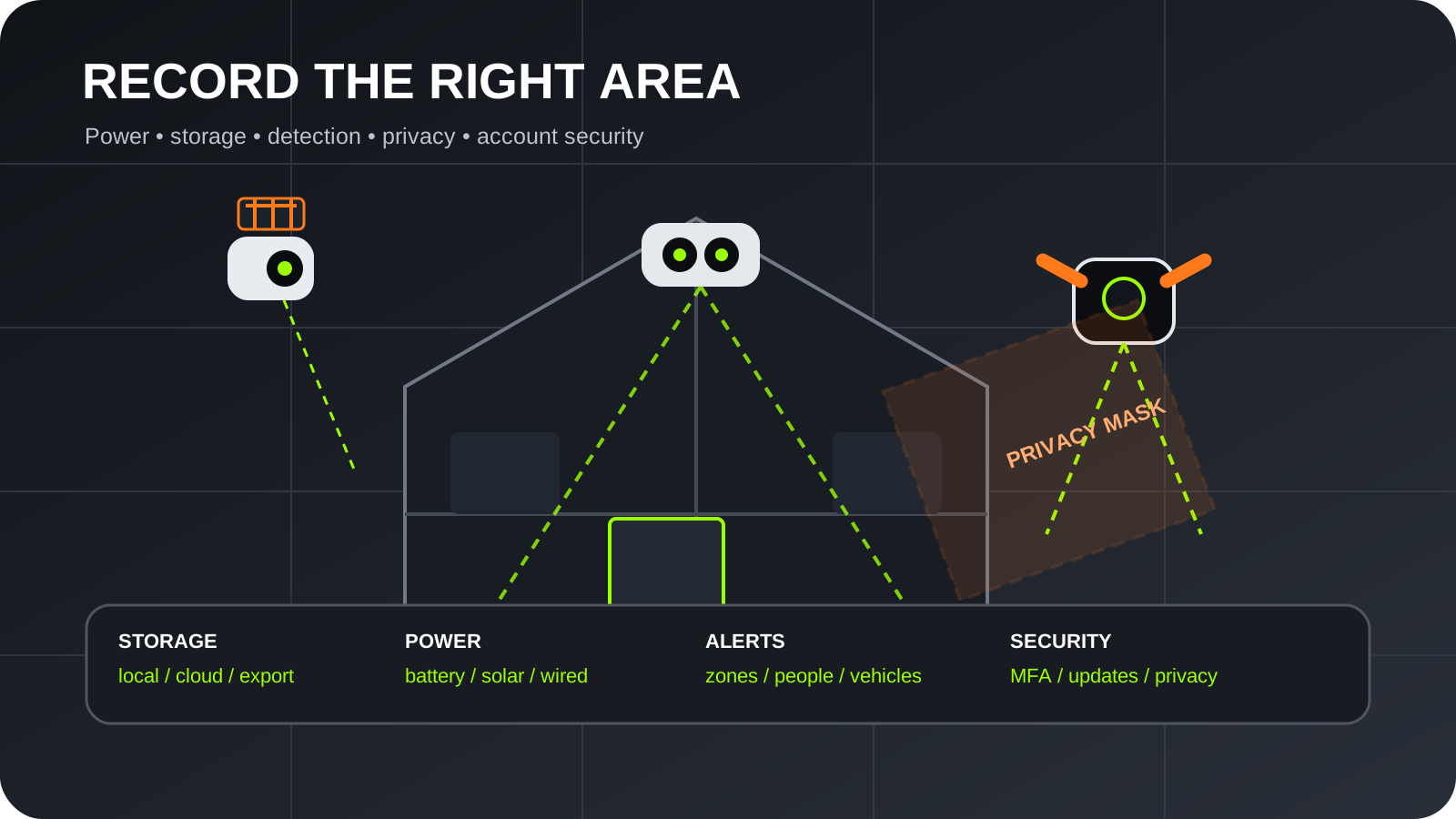
Quick answerOur recommendation in brief
The eufyCam S3 Pro kit is the strongest premium recommendation for local storage and lower subscription dependence. Reolink is the panoramic specialist, Tapo provides the best value entry, Arlo suits buyers paying for polished cloud intelligence and Ring is easiest to justify inside an existing Ring household. Storage policy, privacy, power and detection quality should decide the system before headline resolution.
Our top picks at a glance
| Recommendation | Product | Best for | Lowest price | |
|---|
| Best local-storage premium system | eufyCam S3 Pro 2-Cam Kit | Multi-camera home coverage with local recordings | Check current price | View product |
| Best for panoramic coverage | Reolink Argus 4 Pro | Wide driveways, gardens and entrances | Check current price | View product |
| Best value wire-free camera | TP-Link Tapo C425 | Simple single-camera or gradual multi-camera installations | Check current price | View product |
| Best cloud-led alerts | Arlo Pro 5 2K (previous generation) | Existing Arlo users and managed cloud recording | Check current price | View product |
| Best for existing Ring households | Ring Spotlight Cam Plus Battery (1080p model) | Ring and Alexa users who want illuminated monitoring | Check current price | View product |
Prices shown may change after you leave MainBuyer.
Best local-storage premium systemeufyCam S3 Pro 2-Cam Kit
4K cameras, solar-assisted operation and HomeBase storage make it the most complete shortlist option for buyers avoiding a routine cloud subscription.
Best for: Multi-camera home coverage with local recordings
Read review and retailer links Best for panoramic coverageReolink Argus 4 Pro
Its dual-lens ultra-wide view can cover a broad frontage or garden from one position while retaining local-storage options.
Best for: Wide driveways, gardens and entrances
Read review and retailer links Best value wire-free cameraTP-Link Tapo C425
A broad field of view, microSD recording and optional solar support provide useful flexibility at a lower system cost.
Best for: Simple single-camera or gradual multi-camera installations
Read review and retailer links Best cloud-led alertsArlo Pro 5 2K (previous generation)
A mature app, 2K HDR video and paid intelligent notifications suit buyers who value polished cloud features and accept subscription costs.
Best for: Existing Arlo users and managed cloud recording
Read review and retailer links Best for existing Ring householdsRing Spotlight Cam Plus Battery (1080p model)
Integrated lights, siren and Alexa-focused controls make it a convenient extension to a Ring doorbell or alarm setup.
Best for: Ring and Alexa users who want illuminated monitoring
Read review and retailer links Begin with the area and evidence you need
A camera should have a defined purpose: identifying a visitor, monitoring a vehicle, showing whether a parcel was taken or recording access to a gate. Wide views provide context but can reduce the number of pixels available for a distant face or number plate. A narrow, well-placed camera may capture more useful identification detail than a high-resolution camera trying to cover an entire street. Walk through likely routes and decide which point gives a clear face-height view without easy reach.
Night conditions matter as much as daytime resolution. Infrared produces monochrome footage without visible light, while colour night modes use sensitive sensors, spotlights or both. eufy promotes low-light colour capability on the S3 Pro, Ring integrates spotlights and Reolink emphasises colour panoramic coverage. Exterior lighting, reflective surfaces, rain and passing headlights can change results. Do not assume a dramatic demonstration image will match an unlit side passage.
Local storage and cloud subscriptions create different trade-offs
Local storage can avoid a mandatory monthly fee and keep recordings inside the home, but it requires secure hardware and enough capacity. eufy's HomeBase approach centralises recordings, while Tapo and Reolink support local options that vary by model and accessory. A microSD card inside an accessible camera can be removed with the device, so placement and backup strategy matter. Check whether footage remains available if the internet connection fails and whether recordings can be exported without proprietary software.
Cloud recording protects footage if the camera or local hub is stolen and makes remote access straightforward, but it adds recurring cost and sends personal data to a provider. Arlo and Ring reserve much of their historical recording and intelligent alert value for paid plans. Compare retention length, number of cameras, resolution limits and whether prices apply per device or household. The cheapest camera can become the most expensive over several years.
Battery, wiring and solar affect reliability
Battery cameras are easy to position because they do not require a nearby power cable, but activity, temperature, signal strength and live viewing all affect recharge intervals. A camera facing a busy pavement may wake far more often than the manufacturer's example. Recharge work also influences mounting height: a very high position may be safer from tampering but frustrating to maintain. Removable batteries or a second pack can reduce downtime.
Solar panels can extend operation when they receive useful daylight, but shade, roof overhangs, winter conditions and dirt reduce output. eufy's S3 Pro has solar-assisted hardware and Tapo offers compatible solar kits. Treat solar as battery support rather than permission to ignore the system. Wired cameras provide the most consistent power for continuous or high-activity monitoring, but installation may require drilling, weatherproof cable routes or an electrician.
Detection quality is more important than notification quantity
Useful alerts distinguish people, vehicles, animals and ordinary movement well enough that the household continues paying attention. Excessive alerts from trees, roads or neighbours cause users to mute the system. Detection zones, schedules, sensitivity and object classification should be considered core features rather than optional extras. Some advanced recognition is subscription-dependent, so verify which detections work locally and which require cloud analysis.
Battery cameras usually begin recording after a wake event, which can miss the earliest movement if positioning is poor. A subject walking directly toward a camera may be detected differently from someone crossing its field. Test the chosen angle, approach routes and wireless connection after installation. Keep firmware and apps updated, then review event clips periodically to ensure the system still records the intended area.
Privacy and neighbouring property require restraint
Domestic cameras aimed entirely within private boundaries are treated differently from systems that capture public space or neighbouring property. The ICO provides guidance and complaint information for home CCTV and smart doorbells. Point cameras only where necessary, use privacy masks, avoid recording more audio than required and consider whether signage is appropriate. A security purpose does not justify unlimited observation of a neighbour's garden or windows.
Panoramic products such as the Reolink Argus 4 Pro make careful masking especially important because they can see a broad area. Review the live view after seasonal changes and construction. Trees lose leaves, parked vehicles move and a repositioned mount can widen coverage. Securely delete footage that is no longer required and avoid sharing clips publicly unless there is a legitimate reason.
Secure the camera account and home network
Internet-connected cameras can expose private footage if accounts or devices are compromised. The NCSC recommends changing default passwords, enabling updates and protecting smart-camera accounts. Use a unique password and multi-factor authentication where offered. Keep the recovery email secure and remove access for former household members or installers. Do not expose camera ports directly to the internet unless there is a well-understood need.
Local storage does not automatically make a camera secure. The hub, router, phone app and account all form part of the system. Place hubs where they are not obvious or easily taken, encrypt removable storage when supported and keep the router firmware current. Separate smart devices from personal computers using a suitable guest or IoT network if the router provides meaningful isolation.
Installation height, Wi-Fi and weather protection decide performance
A camera needs a strong enough wireless signal at the final exterior location. Test with the door closed and at the busiest network times before drilling. Brick, foil insulation and external walls can sharply reduce performance, and a camera may connect reliably in a hand-held test but fail after being moved higher. Mesh Wi-Fi can help, but an indoor node placed against the relevant wall is usually more effective than one far away.
Follow the product's weather-rating and temperature guidance, keep charging ports sealed and angle the camera to shed water. Avoid direct views of the sun and nearby white walls that can reflect infrared light. Mounts must be fixed to suitable material, not only render or weak trim. A visible camera can deter, while a discreet camera may capture behaviour more naturally; either way, it should not be easily rotated or removed.
What to consider before buying
- Define the exact event and evidence each camera should capture.
- Calculate subscription cost over at least three years.
- Test Wi-Fi and detection at the final mounting position before drilling.
- Use privacy zones to minimise recording beyond the property.
- Enable unique passwords, multi-factor authentication and automatic updates.
- Plan safe access for charging, cleaning and battery replacement.
Frequently asked questions
Do security cameras work without a subscription?
Yes, when the model supports local recording or useful free cloud features. eufy, Tapo and Reolink provide local-storage routes on relevant products. Ring and Arlo can show live video without a plan, but recorded history and advanced alerts are commonly subscription-led.
Is 4K better than 2K for a security camera?
Higher resolution can preserve more detail, but lens quality, lighting, compression, distance and field of view are equally important. A well-positioned 2K camera may provide more usable evidence than a poorly positioned 4K camera.
How long do battery security cameras last between charges?
It varies widely. Motion frequency, recording length, temperature, Wi-Fi strength, live viewing and detection settings all affect endurance. Manufacturer maximums are normally based on controlled usage assumptions rather than a busy real entrance.
Can my camera record the pavement?
Recording beyond the property boundary can bring additional data-protection responsibilities. Minimise the captured area, use privacy masking and review current ICO guidance. The camera should record only what is reasonably necessary for the stated security purpose.
Are solar security cameras reliable in the UK?
They can reduce charging when the panel receives adequate daylight, but winter, shade and mounting direction matter. Solar should support a healthy battery system; owners should still check charge levels and clean the panel.
Evidence and methodologyHow this guide was prepared
This guide uses official specifications, manufacturer guidance, retailer model information and MainBuyer editorial judgement. It explains trade-offs rather than claiming one product is right for everyone, and it does not describe research-based assessments as hands-on tests.
See how we review, our editorial policy and corrections policy.
Last editorial review: 2026-07-14
SourcesResearch references